
It was the summer of 2023, I'd just graduated and got my computer science degree with an offer. Cursor had just come out a couple of months prior, but for the most part, we were all still hand writing code.
Fast forward to today, I now work at a startup and build projects like Freestyle for fun. I seldom write code by hand. Instead, I operate like a technical PM, where I write up product specs, technical implementation guides for the agent to implement. I'm typing a lot of specs, not code.
That's why I've been voice-pilled lately, trying out different voice dictation apps and building Freestyle Voice. Speaking into my Claude Code terminal has given me a huge edge over typing. My coding experience is hands off, thoughts getting implemented without ever typing a thing.
I wanted to share some of the ways I use Freestyle to accelerate my code velocity.

Voice lets you write more context
You might've heard the phrase "context is king". Coding agents today are not truly intelligent. They're not good at running fully autonomous without human intervention, at least yet. They still need a lot of guidance and human creativity. Context is that fuel.
Coding agents do not need perfect prompts. It is perfectly okay to "thought dump" into a coding agent, the agent will understand what you mean even if you miss a word, write broken english. What you should focus on is prompting the coding agent with as much detail and context as possible.
Instead of generics like "improve the spacing on this page", be more specific on exactly what you want or else the agent will make wrong assumptions: "The header text on the page is a little too big. Try a smaller font size. Maybe 48pt. add some padding at the bottom to the H1 too."
Freestyle voice will also help clean up your thought dumps. We've built a post-processing system that cleans up your "ahhh, uhm" filler words and correctly formats the text.
"Can you double check constants.ts, sorry I mean errors.ts" → "Can you double check errors.ts"
"First, check our README instructions. Second, write a spec" → "1. Read the README instructions, 2. Write a spec"
Consider writing specs over directly prompting Claude Code
Extending the "context is king" concept, consider writing markdown specs instead of prompting directly in Claude Code. Write an implementation or plan spec in your favorite text editor, then feed that into Claude Code for implementation. This is what I exclusively do now for any serious engineering work.
This is my workflow for shipping much larger features:
- Create a /docs directory in the project that I'm working in. This is where all specs live.
- For any new work that I want to do, create a new markdown file for the guidance spec.
- Divide that spec into different parts. Overview for overall context of the work, goals / acceptance criteria, and guidance on what files to look for when making a plan, and instructions to write a technical spec at the end.
- Have an agent take a look at the guidance spec, follow the instructions, then create a technical spec proposing the implementation.
- Review the technical spec, modify and finally have the coding agent implement. Iterate.
What's nice about writing specs in markdown is that you can write these specs in your favorite code editor, right in your code base. Claude Code can make direct edits to your spec too. It's a powerful self improving loop with a source control in case you need to revert some changes.
Voice dictation has made it so much easier to write these specs. I sometimes lose my train of thought when I'm typing, my typing speed isn't too fast. With dictation like Freestyle, it's allowed me to write at the speed of thought.
Setting up voice commands for convenience.
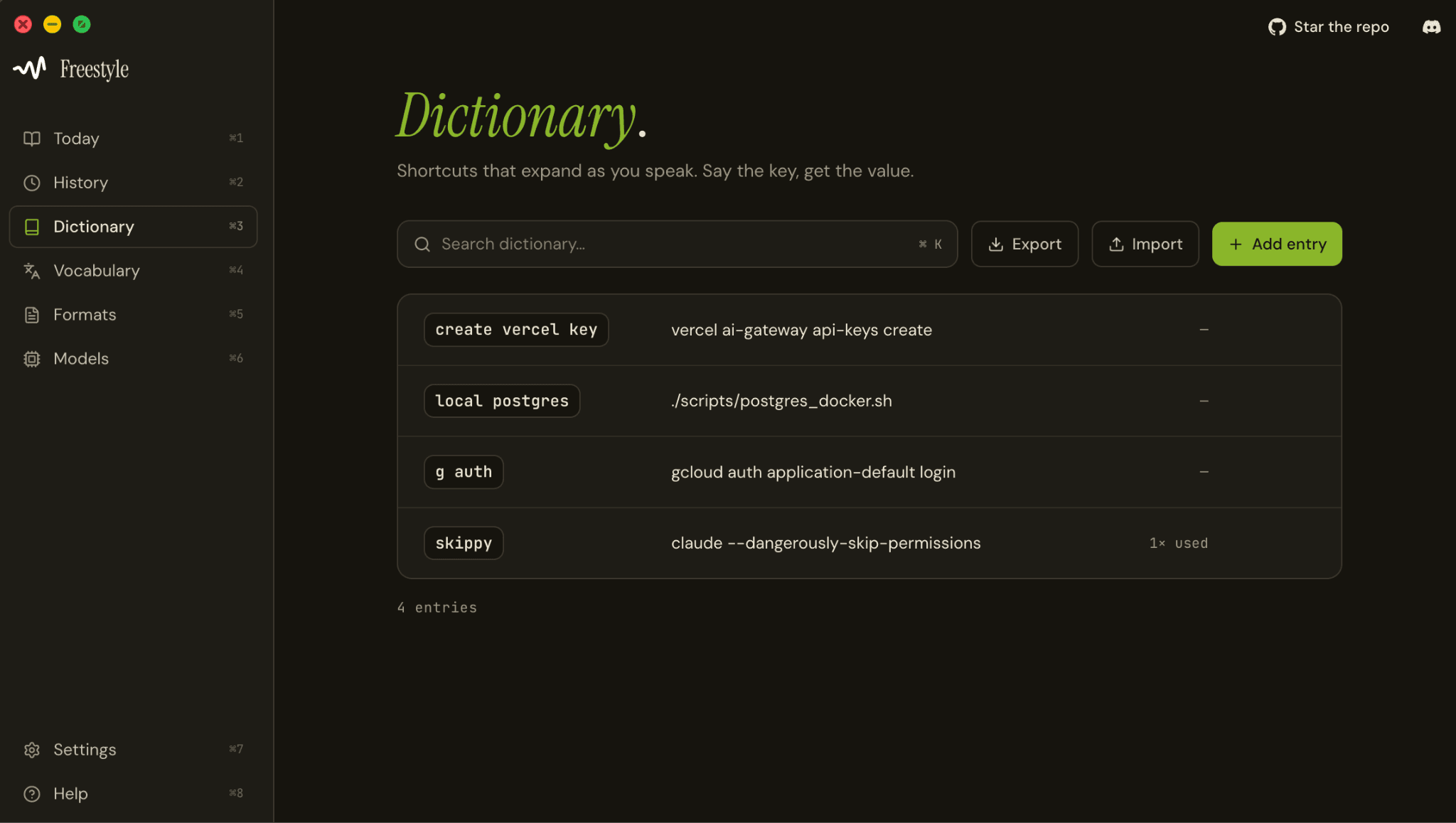
A fun party trick with Freestyle is that you can set up commands. One way I use this is by setting up the keyword "skippy" to Claude Code on dangerously skip permissions, the command claude --dangerously-skip-permissions. This means all I have to do is say "skippy" into my terminal and Claude Code will start. Otherwise, I'd have to type that entire command every time I want to spin up a Claude Code terminal.
You can pretty much set up any trigger word to turn into a single paste. This is great for creating shortcuts for terminal commands that you type out very frequently.
Accelerate coding for non-English speakers.
Voice dictation can also boost Claude Code's accuracy for non-english speakers. Claude Code does have multilingual support, but the performance of it declines when you're not prompting in English.
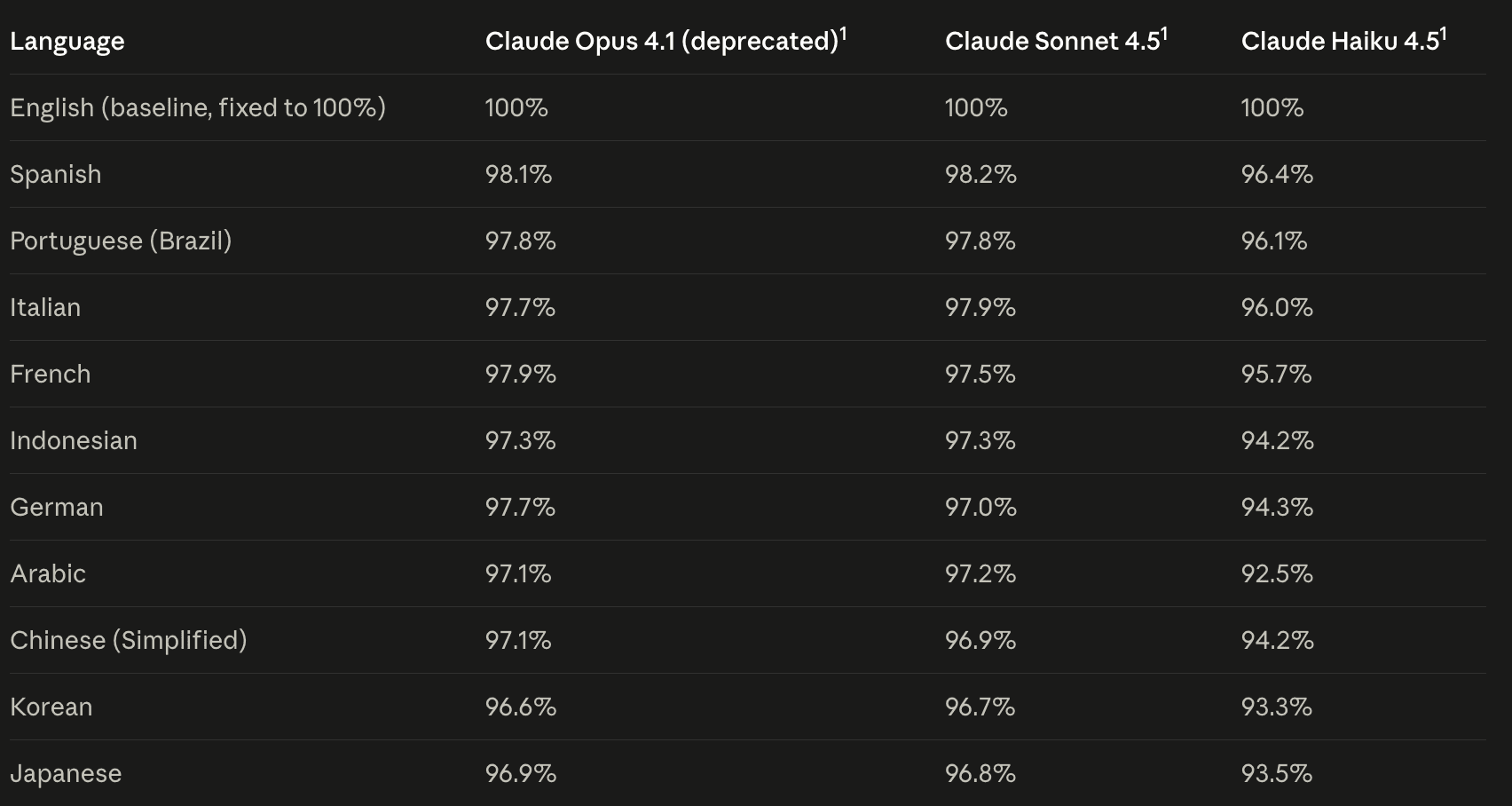
Dictation apps like Freestyle with translation can help you dramatically use Claude Code with better accuracy. Speak what you want in your native tongue, Freestyle will translate it to English for prompting Claude Code.
Try out Freestyle with Claude Code
I hope through this article I convinced you to at least give voice dictation a shot. If you're interested in voice, I'd love to have you try it out Freestyle. Freestyle is free and open source. We also run local models, meaning none of your thoughts ever leave your device.
Check out our downloads page to get started!


